Artificial Intelligence is progressing past just being chatbots into actual operations at companies around the world. Businesses use an AI agent to automate work processes, assist internal teams, process documents, get data retrieved, and coordinate activities across software solutions.
Today’s AI agents typically rely on retrieval-augmented generation (RAG) of information stored on a company’s internal document management system, knowledge base, policy should-be, and operations information. Due to this reason, companies internally evaluate companies that specialize in RAG development when they want an enterprise AI solution capable of retrieving correct and secure information from their systems and using it through the business workflow.
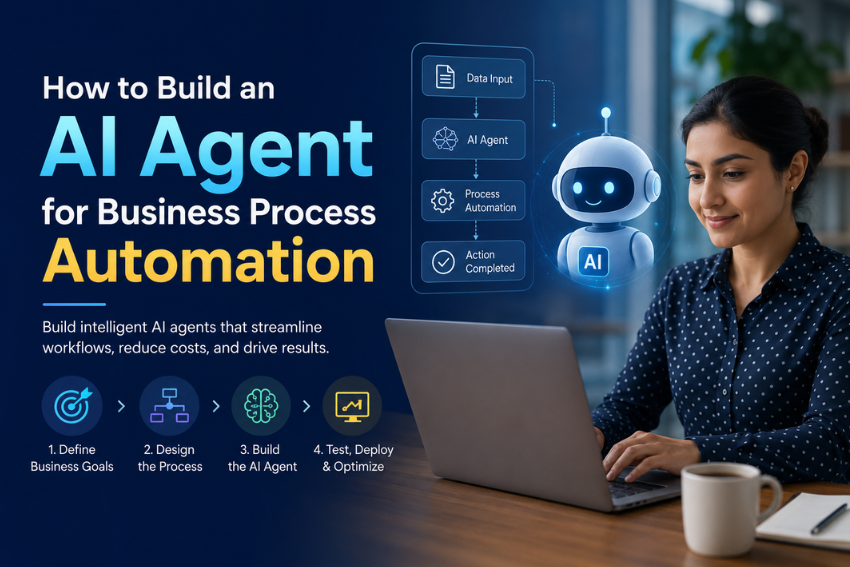
What is an AI agent?
AI Agents are software programs that can comprehend goals; process information; make decisions, and take actions (based on limited human input).
An AI agent is more capable than a simple Chatbot (which typically only responds to questions). They can also retrieve information, verify records, create records, send requests, update systems, and escalate issues when necessary.
As an example of how this could be integrated into customer service: A Customer Service Agent using an AI Agent could analyze the client’s question; obtain relevant product documentation; review the customer’s CRM History; prepare a suitable response; create a support ticket for the client; and notify the correct department of the new support ticket.
The main benefit comes from combining reasoning with action.
Why Businesses Use an AI Agent for Automation
Generally, business processes are performed by human beings using paper sources. For example, searching for documentation, entering records into programs that create spreadsheets, generating reports, answering various repetitive questions etc… and all of these functions have become a standard way to do things because they take longer and more effort.
By using AI agents to reduce some of that workload, businesses can accomplish these tasks in record time and retrieve information almost instantly from multiple systems when responding to requests. In addition, AI agents provide automated ways to execute routine business processes across multiple computer applications.
Businesses are also utilizing AI agents to streamline support operations, human resources workflows, finance processes, internal knowledge management, logistics coordination, and IT service management.
It’s important to recognize that AI agents will not completely replace human teams but rather reduce the burden from repetitive tasks so that employees can spend more time making higher-value decisions.
Where AI Agents Create The Most Value
AI agents are most effective when there are processes with sufficient repetition, plenty of data to process, and defined business rules to follow. This has made customer service a prime use case for AI agents. Customer service representatives can use AI agents to provide answers to frequently asked questions, collate information for ticket summaries, provide relevant responses to customers, or escalate more complex issues to the appropriate subject matter expert.
AI agents can be helpful in HR departments as well. Companies can use AI agents to respond to employee inquiries, develop onboarding materials, set up interviews, and prepare internal documents from information collected by HR via AI.
Finance can automate invoice classification and approve/review domain-specific expenses, create reports, and extract data from numerous paper-based documents by creating invoices.
Using AI agents, IT is capable of classifying and determining what type of support should be provided based on a variety of support requests, proposing solutions and updates to existing support tickets, and tracking recurrence of support incidents.
Utilizing AI in this way means that an employee can use their time more efficiently by not having to waste time looking for information across several different systems that do not have any type of integration between them.
Step by Step Guide to Build an AI Agent for Business Process Automation
This step-by-step guide explains how to design, develop, and deploy an AI agent that automates workflows while integrating seamlessly with existing business systems.
Step 1: Define the business process
When developing an artificial intelligence agent, it is important to begin with a clear business process requirement rather than a particular technology. Companies should determine the purpose of the AI agent, intended users of the agent, systems used in conjunction with the agent, and the outcome of the use of the AI agent.
For example, improving customer support might be too general; however, by reducing the amount of time to respond to product support queries by using documented information that has been preapproved would be more appropriate.
By clearly defining the objectives of the company to be served by the AI agent(s), the correct architecture, data sources, integration and success metrics will be provided. If there is no defined business problem to solve, then the AI agent may be an expensive project with insignificant value.
Step 2: Prepare business data
An agent’s performance will primarily rely on the quality of the data they are working with. Outdated, duplicate, or fragmented (dispersed among multiple, unlinked tools) company information will hinder an agent’s ability to provide correct answers.
Teams should evaluate any data source the agent will utilize before they begin developing functionality for the agent, including product documents, internal policies, CRM documents, service tickets, contracts, reports, and operational databases.
The data must be cleaned, structured, and organized based on access level. This process is especially critical for agents who work with sensitive corporate or customer data.
Step 3: Build retrieval functionality
Business AI agents should not depend solely on the general knowledge provided by a language model. They require access to trustworthy internal information sources. Retrieval-Augmented Generation (RAG) is the ideal solution to this challenge.
RAG allows the system to look up reliable company data prior to creating an answer. This increases accuracy and provides agents with up-to-date commercial information to use when responding to clients or employees.
For example, rather than trying to guess at what the most recent refund policy is, an agent can now look up the most recent organization-approved refund policy from the company’s knowledge repository and respond based upon its content.
As well, this will assist in improving the ease of making updates, as companies are able to modify documents in their knowledge repositories without needing to go through retraining of the model.
Step 4: Connect the agent to business tools
When you have a fully integrated AI agent that can perform actions, you vastly increase its utility.
In most cases in order to automate actual processes the agent will need to integrate with CRM applications, ERP applications, project management applications, HR applications, ticketing applications, email, calendar & database systems.
To illustrate, for instance, let us consider “an Ai Sales Agent.” An AI Sales Agent can summarize leads and update CRM records. They can schedule follow-up activities and produce summary emails based on each lead.
The same holds true of “an Ai Operations Agent,” who may be able to do the following: Check the status of an order, obtain shipment details from within the shipment database, send notifications to the customer service department when an item is shipped.”
With these types of integrations, you turn the agent from being an information assistant to being a workflow automation agent.
Step 5: Add permissions and approval rules
The business systems should not be available to AI agents without limitations. Businesses will require clearly defined permission models to follow. An AI agent will only have access to the data and actions it needs as part of its role. Some types of business systems can operate in an automatic mode, such as providing a summary of a document or answering a simple question about the company internally. Others will require human approval before the agent completes the action, such as payment, creating legal documents, providing customer information, or making compliance-sensitive decisions.
Businesses also need audit logs for the AI agent. It is critical for businesses to have a record of what the AI agent has accessed and what types of actions the AI agent has performed on behalf of the user who requested the task be performed.
Through proper business governance, businesses can reduce daily operation risks and security risks.
Step 6: Test the agent with real workflows
Tests should be representative of real business conditions.
Evaluate the agent’s performance with real user requests, partially completed data, unusual situations and unexpected inputs.
Starting with a pilot launch is an excellent way to get your new technology into the direction seamlessly. A small team or one workflow where the agent can be used as a involved with the focus of getting the agent ready for full implementation across the entire business will enable faster implementation. During testing you will want to monitor the accuracy of responses, completion rate of assigned tasks, desire level of escalation, user satisfaction and error pattern for further development purposes before it begins critical operations as part of your current resources.
Step 7: Monitor and improve continuously
AI agents are required to receive constant monitoring; as the data used by businesses can fluctuate, as can the processes used internally and the needs of the users.
If agents are not kept current, many times their performances can degrade over time.
To help maintain an agent’s performance level, teams should regularly review any failed responses, update their knowledge source(s), make any needed modifications to the prompts provided to the agent, refine permission settings and adjust workflows created for users based on their feedback.
Continuous improvement to the AI agent is especially required for agent that assist customers and/or process operational data.
Agents that provide a successful level of service to its users must evolve along with the actions of the business.
Key Technologies Behind AI Agents
A Business AI Agent (BAIA) generally contains multiple technical elements. The Language Model provides understanding and creates responses. The Retrieval System connects the BAIA with internal knowledge. APIs enable the BAIA to use business applications. The Workflow Engine determines the logic for the BAIA’s processes. Monitoring Tools capture performance and error data.
Security components control Access to Assets, encrypt data, and create Audit Trails of all Access requests.
The architecture used for BAIA will depend upon the use case. A basic Knowledge BAIA will have fewer integration points (often only connections to internal Knowledge databases). More Complex Financial or Logistics Automation BAIA will contain multiple complex authorization requirements, environmental and application integrations, and the ability to create approval workflows.
How Much Does AI Agent Development Cost?
AI agent development cost is determined by the complexity of the development. For example, a simple internal assistant that connects to a limited knowledge base will generally be cheaper than creating a complex enterprise AI agent that is integrated with multiple systems (i.e. CRM, accounting, etc.).
Data preparation, regular audits of the system, development of the model, integrations, security requirements, testing, and ongoing maintenance are all major cost factors that should be taken into account when calculating the total cost of developing an AI agent.
Simple AI agents can begin developing at tens of thousands of dollars, while advanced AI agents that require multiple systems integration and have strict security requirements can be Very cost prohibitive.
In addition, when preparing for new launches businesses should consider ongoing costs associated with keeping systems operational, and there are many considerations when creating budgets that account for all spending post-launch, including costs incurred by web hosting, backend services like modelling applications, monitoring services, product updates/changes that occur through software release cycles, linking to systems being maintained through cloud hosting models and ongoing knowledge base maintenance using third party sites, etc.
Common Mistakes Companies Make
Starting with AI tech prior to defining a business’s problem is a typical error in working with AI. Another typical error involves attaching agents to inadequate quality data, as even the best model will generate bad results when using… Since it is vital that an agent is able to work with a large amount of data, agents can have too much autonomous decision rights too soon, increasing risks when the system accesses sensitive data or utilizes business-critical tools. Weak testing is a separate issue; agents must be tested against real life workflows prior to going into full production. On the flip side, most successful AI initiatives begin with small proof-of-value project and can scale over time.
Final Thoughts
AI Agents are being used to automate repetitive processes, increase access to data/information & help speed up operational decision-making processes for Businesses.
To successfully develop AI agents, companies require clear objectives, consistent and quality data, an accessible retrieval system, secure integration of various systems, permission control, and ongoing monitoring.
The best AI agents are not just merely chat services they act as intelligent layers of workflow that link people, systems, and business data together.
By choosing practical use cases and building on solid structure from the beginning, companies can establish AI agents as significant resources in the pursuit of long-term automated business processes.