All the back office tasks play a vital role in ensuring efficient operations of any business. These back-office tasks are vital for the smooth running and expansion of a business, ranging from payroll and accounting to processing invoices and managing employees. This can become time consuming, costly and error-prone as companies grow in size.
Automation saves businesses time, money, man power and boosts accuracy when it comes to repetitive tasks. Here you will learn how to automatically handle the most common back office tasks and gain insights into how this can make tasks easier and help you create a more efficient and scalable business.
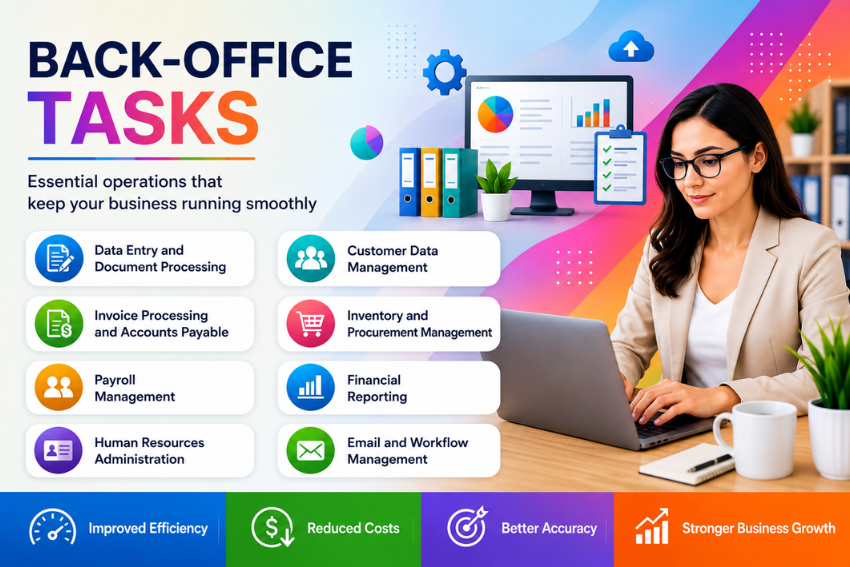
What Are Back Office Tasks?
Back office tasks are the work that helps a company’s products or services. These are the things that happen behind the scenes. The front office is where people talk to customers. The back office is where people do the work to keep everything running smoothly. They make sure the company is following the rules and has money. You might not see what they do. They are very important for making sure customers are happy.
Back office teams are usually made up of departments like finance, accounting, human resources and information technology. Each team does a lot of work that needs to be done just right. For example, the people in accounting make sure all the money is accounted for the human resources team takes care of employee information and the operations team makes sure everything runs smoothly. These teams have to deal with a lot of papers, approvals and calculations which can be time consuming.
These days companies have to follow a lot of rules and deal with a lot of information. They have to make sure every invoice, employee document and financial report is done correctly and stored safely. If they do all this work, by hand they might make mistakes or lose papers. If they use automation software, they can avoid these problems. The software follows the rules. Checks everything automatically so companies can be sure they are doing everything right. As companies start to use technology it is becoming very important for them to automate their back office tasks. Back office automation is no longer something they can just consider it is something they need to do.
Why Back Office Operations Matter
Back office operations are really important for a business to run well. Things like paying employees keeping track of money buying things and making financial reports help everything work properly and make sure people get what they need on time.
If these things are not done well, it can cause problems. Cost a lot of money. This can slow down the business. If a business makes its back office work better by using the steps every time and automating some tasks the business can get more work done follow the rules better and make good decisions because it has the right information, at the right time.
Why Businesses Are Automating Back Office Tasks
Businesses must get more efficient while watching their costs. Doing things manually in the back office often slows things down makes mistakes and gets less done. Automating back office tasks helps make work flow better gets more accurate and lets employees do important work.
Rising Operational Costs
As businesses get bigger handling paperwork gets more costly. Automation cuts down on work quickens up every day processes and helps companies grow without spending a lot more on operations. Businesses need automation to keep costs under control.
Growing Need for Accuracy
Mistakes, in payroll, invoicing and financial records can cause errors and compliance problems. Automation makes data more accurate standardizes work processes and keeps records, which helps businesses run more smoothly. Automation improves accuracy. Businesses need data to make good decisions.
Common Back Office Tasks That Can Be Automated
Many back office tasks involve processes that are ideal for automation. Automating these tasks helps businesses save time reduce errors and improve productivity. This makes daily operations run smoothly. Here are some common back office functions that organizations can automate:
Data Entry and Document Processing
Data entry is one of the time-consuming tasks in many organizations. Employees often transfer information from invoices, receipts and forms into accounting software. These activities are essential. Do not add much value. They also create opportunities for human error.
Automation changes this process through document processing. Software extracts data directly from digital documents validates it and transfers it into the business system. Employees simply review exceptions than processing every document. This reduces processing time. Improves data accuracy.
The benefits of automation include:
- Faster document retrieval
- Record management
- Improved compliance
Digital workflows eliminate paper-based filing systems. This makes information easier to search and access. Businesses handling documents experience substantial productivity improvements after implementing automated document processing solutions. They can automate data entry and document processing to save time.
Invoice Processing and Accounts Payable
Accounts payable departments handle invoices every month. Traditional invoice processing involves receiving invoices verifying purchase orders and obtaining approvals. Each step requires attention. Delays can result in payment penalties or strained supplier relationships.
Automation simplifies the invoice lifecycle. Modern systems automatically capture invoice details match invoices with purchase orders and route them to managers for approval. Employees receive notifications when action is required. This reduces email exchanges and follow-up calls.
- The advantages of automation include:
- Improved supplier relationships
- Timely payments
- Standardized approval workflows
- Complete visibility, into outstanding liabilities
Finance teams also gain real-time reporting. This supports cash flow management and budgeting decisions. They can automate invoice processing and accounts payable to improve their workflow. Automating accounts payable helps businesses streamline their operations.
| Manual Invoice Processing | Automated Invoice Processing |
|---|---|
| Manual data entry | Automatic data extraction |
| Paper approvals | Digital approval workflows |
| Higher error rates | Improved accuracy |
| Slow payment cycles | Faster payment processing |
| Limited visibility | Real time tracking |
| Manual record storage | Digital document management |
Payroll Management
Payroll is really important for any organization. Employees want to get their salaries right with the taxes, overtime pay, bonuses and benefits every time they get paid. If payroll is done manually there is a chance of making mistakes that can affect how much employees trust the company and even cause problems with the law.
Payroll automation helps by doing all the calculations automatically using rules that are already set. This includes things like how hours an employee worked their tax rate and any money taken out for retirement or insurance. All of this information can be put into one system that calculates salaries automatically and makes payment files without anyone having to do it by hand.
Automated payroll also makes it easier for companies to follow the rules when it comes to taxes and employment laws. They can make tax reports and summaries at the end of the year. Even give employees their pay statements, all with very little work. The people in charge of resources can then focus on helping employees and planning for the future instead of just doing calculations all day.
Human Resources Administration
The human resources department has a lot of work to do when it comes to taking care of employees. They have to do things like hire people get them started at the company keep track of who is working and who is not and even do performance reviews. If all of this is done manually it can take a time and even cause problems.
Automation helps by making workflows that guide employees through every step of their job. New employees can even fill out their paperwork online before they start working. When someone wants to take time off it gets sent to their manager to approve and their attendance record gets updated right away. Even performance reviews and reminders for training can be scheduled automatically.
All of this makes things better for both employees and the human resources team. Employees can get to their information faster using portals and the human resources team does not have to spend as much time doing paperwork. Everything is also more secure and easier to comply with the law. It gives the company a better understanding of its employees.
Customer Data Management
Even though customer service teams talk to customers directly keeping track of customer information is often seen as a job for the office. Companies are always getting information about their customers from their website, sales team, support team, marketing and billing. As the company grows it gets harder to make sure all of this information is correct.
Automation helps by keeping all of the customer information up to date in time. When a customer updates their contact information it gets changed in all of the company’s systems. This even helps to find records and make sure all of the information is correct.
Having customer information helps companies talk to their customers in a more personal way make better reports and have stronger relationships with them. Sales teams can get the information before they call a customer support teams can solve problems faster and marketing teams can make campaigns that are targeted to the customer’s needs. Of having separate databases companies can have one view of each customer using automation.
Inventory and Procurement Management
Inventory and procurement are important back office tasks that have a direct impact on profitability and customer satisfaction. Inaccurate stock records and delayed purchase orders can lead to stockouts, overstocking, and wasted time and money. Manual inventory tracking may be based on spreadsheets and inventories taken at certain intervals, which can be challenging to keep inventory products and materials in real time.
Automation revolutionizes inventory management by harmonizing stock levels throughout warehouses, sales channels, and procurement processes. Sales and the arrival of new inventory are automatically updated to inventory records whenever they occur. Automatic reorder points can also be set, which will trigger purchase orders when the desired stock level is reached. This minimizes the risk of stock out of critical products and will avoid overstocking, which will tie up valuable capital.
In addition, procurement workflows are made much more efficient with automation. Requests for products can be made electronically and passed to managers for approval with the automatic creation of a purchase order. Suppliers are automatically notified, and procurement teams get full visibility of purchasing activities. Accurate inventory management and quick procurement speed up the business operations, thereby maintaining a good relationship with the suppliers.
Financial Reporting
Financial reporting is a key element of business planning, compliance and executive decision making. Conventional reporting may involve a lot of employees having to dig through a few systems, check information to ensure accuracy, do some math, and manually create and manipulate spreadsheets. These repetitive tasks can waste precious time and introduce inaccuracies into reporting.
Automation allows finance teams to create reports straight from integrated accounting systems. Revenue, expenses, cash flow, budgets, tax information and financial performance indicators are automatically updated, giving decision makers timely and reliable insights. Executives can get access to dashboards which provide real time information on the current financial performance of the business rather than waiting for the end of the month.
Automated reporting also boosts consistency and compliance. Financial data is consistent within departments and reporting periods thanks to standardized report templates. Supporting documentation is stored digitally and linked to financial transactions, making audit preparation much easier. Finance experts will be able to focus on financial analysis, forecasting and strategic planning for future expansions of their business instead of manually preparing reports.
Email and Workflow Management
Email is one of the most used methods of communication in business, but it can be a time-consuming process. Staff forward documents, ask for approval, send reminders, and follow up on responses, all while spending hours on these tasks. It is possible that important messages may be missed and requests for approvals may be missed or delayed, due to lack of a well defined workflow.
These communication chains are replaced by pre-defined business processes with workflow automation. Unlike multiple emailing, employees set up automated workflows to route documents to the right people within the company, according to company policy. Managers are alerted if approvals need to be made and reminders are sent out automatically if deadlines are getting closer.
Furthermore, automation can enhance team collaboration between different departments. Standardized workflows for Marketing, Finance, HR, Procurement and Operations teams can take place without endless email threads. All actions are captured in the system so that progress can be easily tracked and bottlenecks identified. This makes organizations more efficient at finishing jobs, more open and more accountable.
Technologies Powering Back Office Automation
Modern automation solutions are a collection of advanced technologies that are used to automate administrative tasks. These technologies are designed to eliminate repetitive work, enhance accuracy and to build intelligent workflows, which adapt to the changing business needs.
Artificial Intelligence and Machine Learning
Business automation has become so much more than just a rule-based workflow with AI. AI can categorize documents, identify handwritten text, forecast trends, detect abnormalities, and suggest actions, all from a historical perspective. Machine learning models are trained through prior transactions and continually evolve to become increasingly accurate.
For example, AI can classify invoices, send alerts for duplicate payments, flag unusual financial transactions, or prioritize customer support requests. Human employees still participate in complex decisions, but AI saves time, reduces repetitive administrative tasks, and enhances decision-making capabilities.
Robotic Process Automation
Robotics Process Automation (RPA) is software robots that execute repetitive digital tasks in the same way that humans do. These bots log into applications, copy information, fill in forms, create reports, move files and perform repetitive processes on multiple systems.
The real value of RPA is that it’s compatible with the current business applications, without having to replace the entire system. Quickly repeat repetitive tasks with no changes to current software. This makes RPA one of the quickest ways to boost operational efficiency and decrease administrative workloads.
Cloud Based Business Software
The advent of cloud-based platforms has brought automation to the fingertips of businesses of all sizes. Rather than implement complex software on local servers, organizations can gain access to secure software using the internet. Cloud solutions help to make collaboration easier as employees can access the same information in real-time from any location.
Cloud platforms are also seamlessly connected with accounting software, customer relationship management systems, payroll software, inventory software, and communication software. This smooth integration enables the automatic sharing of information across departments, eliminating redundant tasks and enhancing the efficiency of the organization.
Best Practices for Successful Automation
Successful automation requires thoughtful planning rather than simply purchasing new software. Businesses achieve the best results when they automate processes strategically and involve employees throughout the implementation journey.
Choosing the Right Processes
Not every business process needs to be automated away. Organizations should start by finding tasks that employees do over and over that take up a lot of time and are done in a way. Automation of high volume administrative business processes usually gives the results because it saves money on labor costs and reduces mistakes. Business process automation is good, for these tasks because business process automation saves time and money.
Consider these factors before selecting processes for automation:
- High transaction volume
- Repetitive manual activities
- Standardized decision making
- Frequent human errors
- Compliance requirements
- Multiple approval steps
Starting with a few well defined workflows allows employees to become familiar with automation before expanding into more advanced business processes.
Measuring Success and Continuous Improvement
Automation is not something you do once. Then forget about. Businesses need to keep an eye on how things are going and look for ways to make automation better. Key performance indicators are important for organizations to see if automation is really doing what it is supposed to do, which is deliver the benefits that businesses expect from automation.
Common performance metrics include:
- Processing time
- Cost per transaction
- Error rate
- Employee productivity
- Customer satisfaction
- Compliance performance
- Return on investment
Regular reviews allow organizations to optimize workflows, update business rules, and expand automation into additional departments as operational needs evolve.
Conclusion
Businesses these days cannot do everything by hand. When companies get bigger doing the tasks over and over becomes really expensive and takes a lot of time. People can also make mistakes when they do things manually. Automating Back Office Tasks helps companies work better follow the rules save money and get things done faster without making mistakes.
Automating Back Office Tasks is good for every part of the company. This includes things like putting information into computers paying employees buying things making reports, managing customer information and automating work. When these tasks are automated employees have time to think about problems help customers and make the company grow. This makes the company more flexible and able to change when things happen in the market.
The best way to tasks is to start with a clear plan and do it a little at a time. Do not try to automate everything all at once. Businesses should start with the tasks that are repeated a lot and that will make a difference. When these tasks are automated companies will be stronger and better able to try things grow and be successful, in the long run. Automating Back Office Tasks is a way to make this happen.
Frequently Asked Questions
What are Back Office Tasks?
Back office tasks are things that happen inside a company to help it run smoothly. These tasks include things like payroll, accounting and managing inventory. They also include procurement, human resources, financial reporting, data entry and managing documents.
Which back office process is the easiest to automate?
Data entry is a task that can be easily automated because it has rules and involves doing the same thing over and over. Many companies also automate tasks like processing invoices, payroll and approval workflows when they start using technology.
Does automation replace employees?
Automation is meant to get rid of tasks that’re repetitive not to replace employees who have skills. Most companies use automation to free up staff from work. This way staff can focus on planning serving customers coming up with new ideas and growing the business.
What technologies are commonly used for back office automation?
The commonly used technologies, for automation include Artificial Intelligence, Machine Learning and Robotic Process Automation. Other technologies used are Intelligent Document Processing, Optical Character Recognition and software that is based in the cloud.
How can small businesses start automating Back Office Tasks?
Small businesses should first identify tasks that are repetitive and time-consuming. Examples of such tasks include invoice approval, payroll processing, document management, and updating customer data. Implementing automation solutions one by one helps teams adapt to the changes and allows them to see improvements quickly.