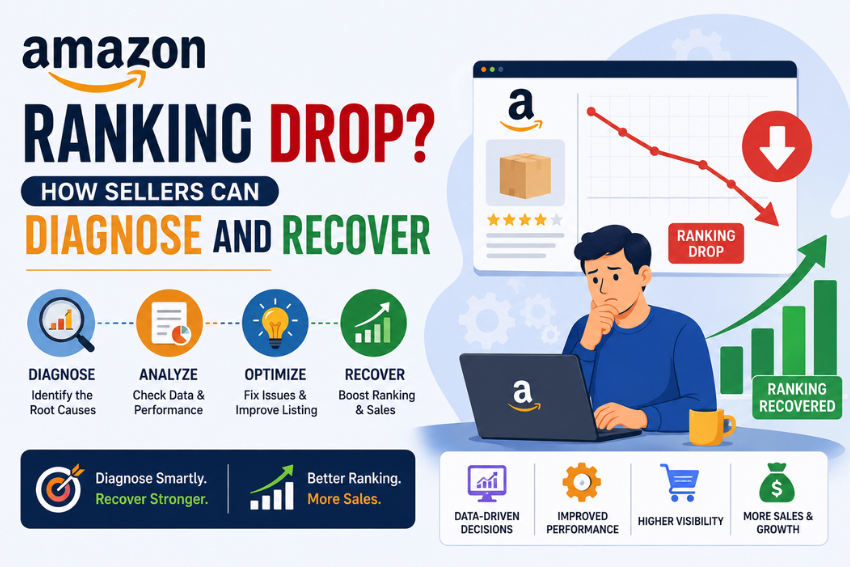
When a product ranking slides from page one, the revenuee impact appears in days, not weeks. An Amazon ranking drop almost always traces to a specific cause, yet many sellers respond by editing the listing at random and worsen it. The faster path is a structured diagnosis. Isolate what changed, confirm the signal, and fix the one signal that broke.
Organic positioning on Amazon is the result of various internal signals—such as conversion rate, sales velocity, seller health, listing relevance, and sales performance—and how effectively your content meets shopper needs via Amazon’s AI layer. A drop in ranking indicates that one or more of these factors have changed. The task is to identify which signal caused the decline and address it to regain the lost ranking.
Here is the method by which you can identify the trigger, trace its source, regain rankings, and prevent further decline.
Why Will Product Ranking on Amazon Be Different?
Amazon’s search engine has evolved significantly beyond the “keyword-matching” logic of the original A9 system—a concept still discussed in most seller guides today.
In the community, this is referred to as “A10,” reflecting a shift in focus: conversion rate matters more than raw sales volume; external traffic from sources like Google, social media, and influencers is valued as an indicator of genuine demand; and seller authority (such as account health, order defect rate, response time, and fulfillment reliability) directly impacts visibility. Rankings for out-of-stock products drop rapidly, as product availability is now considered a prerequisite for ranking rather than merely a result of it.
Two AI systems operate on top of this, having redefined the rules of ‘relevance’:
- COSMO is Amazon’s ‘intent model’: Instead of merely matching words (keywords), it comprehends the true meaning of a query and adjusts rankings in real-time based on actual shopper behavior.
- Alexa for Shopping (launched by Amazon in 2024 and rapidly expanded in 2025) is powered by COSMO. It suggests products by analyzing listings, reviews, Q&A sections, and external content. This is not a free feature.
According to Amazon’s own reports, over 300 million customers used Rufus in 2025; the number of monthly active users grew by approximately 149% year-over-year, and the assistant drove an additional $12 billion in annual sales—with customers shopping via Rufus completing purchases at a significantly higher rate than those using traditional search methods.
If your rankings are dropping, a practical implication is that ‘relevance’ has now become ‘semantic’ (meaning-based). A listing stuffed with keywords—yet failing to adequately answer buyers’ queries—can quietly lose its top spot to a competitor whose content better aligns with buyer intent, even if the listing has no technical issues by traditional standards. Keep this in mind during your analysis, as some ranking drops these days occur without any apparent technical cause.
What Does a Drop in Amazon Ranking Mean?
Organic rank on Amazon depends on three measurable signals, and a decline implies that at least one of these signals has weakened:
- Sales Velocity: The number of units sold within a specific timeframe, with sales from the last 30 days carrying the most weight.
- Conversion Rate: The ratio of sessions that result in a purchase; this is determined by click-through and add-to-cart behavior.
- Keyword Relevance: How well your product data matches the terms actually typed by shoppers.
Since the detail page does not change on its own, a drop in ranking points to an event that you can identify. Compared to these three signals, minor changes to the copy have a negligible impact on rank. Treat the drop as a symptom and then examine the key metrics that influence your organic ranking.
How Do You Distinguish Between a Genuine Drop in Amazon Rankings and Normal Fluctuations?
Before optimizing an affected Amazon listing, ensure the ranking drop stems from a significant issue rather than routine, minor variations. Rankings constantly shift due to factors like competitor bids, inventory changes, and search demand cycles. The pattern of the decline indicates where to look:
- Sharp drop (cliff): Rankings plummet rapidly within a day or two, signaling a serious event such as a stockout or listing suspension.
- Gradual decline (slide): Rankings slip slowly over weeks, pointing to incremental issues like a drop in conversion rates or a competitor gaining momentum.
Gather 14 to 30 days of keyword ranking history before diagnosing the problem. If rankings for all tracked keywords have dropped simultaneously, the cause is almost certainly a major ASIN- or account-level issue.
If only specific keywords have dropped while others remain stable, the problem may relate to the relevance of those specific terms or targeted competition. Making this simple distinction saves hours of work by ruling out numerous potential causes before you even open a report.
Common Reasons for Sudden Rank Drops on Amazon
Most drops in Amazon rankings occur due to specific reasons. Understand these factors based on their likelihood and the speed of their impact:
- Stockouts: When available inventory hits zero, sales velocity drops, and the algorithm rapidly lowers the ASIN’s ranking.
- Losing the Featured Offer (Buy Box): Losing this feature—often due to pricing or compliance issues—reduces conversions, as most shoppers make purchases through it.
- Listing Suppression: When a listing fails automated validation regarding images, attributes, restricted terms, or compliance documentation, Amazon removes it from search indexing.
- Unplanned Listing Changes: Removing high-volume keywords from the title or backend terms diminishes relevance, causing the product to be de-indexed for that query.
- Price Increases: Higher prices reduce conversions, and the algorithm interprets a lower conversion rate as a sign of reduced relevance.
- Account Health Issues: Intellectual property complaints, safety notices, or performance declines can reduce catalog visibility.
- Falling Behind Competition: A competitor with better sales velocity, clearer images, or more competitive pricing may overtake your position.
Each cause requires a different approach to identify; therefore, accurately diagnosing the problem is essential before implementing any corrective measures.
A Repeatable Diagnostic Workflow
Sudden changes can prolong recovery time. Follow this established diagnostic workflow to quickly identify the root cause:
- Create a timeline: Note the exact date your Amazon listing’s rank dropped, then cross-reference it with logs of changes made to price, inventory, and content.
- Check inventory history: Match the date of the ranking drop with stockout events, as having less than 30 days of stock cover can lead to demotion.
- Confirm indexing: Search for your main keywords alongside your brand or ASIN; if the listing does not appear, it may have been de-indexed or suppressed.
- Review the featured offer: Ensure you still meet eligibility criteria and that the offer hasn’t been removed due to a fair-pricing flag.
- Audit conversion and traffic: In Amazon Seller Central, compare sessions, unit session percentage, and return rates from before and after the drop.
- Check Amazon account health: Look for policy notifications, IP-related complaints, or suppressed-listing alerts associated with that specific date.
- Assess competitors: Identify which competitor ASIN has taken your ranking spot and note any changes made to their product detail pages.
Regaining Lost Amazon Rankings to Boost Sales Velocity
Once you identify the cause of the drop, focus on fixing the specific issue that triggered it rather than following a generic recovery checklist:
- After going out of stock: Replenish inventory, then boost sales velocity using targeted PPC and short-term promotional pushes to signal renewed demand.
- After listing suppression: Fix the problematic attributes, images, or documents, then request reinstatement via a Seller Central case.
- After incorrect changes: Restore keywords removed from titles and backend terms, then verify if the ASIN has been re-indexed for the target queries.
- After losing the ‘featured offer’: Resolve the pricing or compliance issue that caused the loss of eligibility, as organic rankings rarely recover if conversion rates remain low.
- After a drop in conversions: Optimize the main image, title, and A+ content using Amazon SEO best practices, as an improved, keyword-optimized detail page can boost both Amazon rankings and conversion rates.
Recovery time depends on the root cause of the issue. Stock-related problems are often resolved within one to two weeks, whereas recovering from losses due to competition requires more time and sustained effort.
For large catalogs requiring updates to images, attributes, and keyword mapping across multiple ASINs, organized Amazon listing optimization services can accelerate recovery and reduce the risk of repeated listing suspensions.
Build a Catalog Governance Framework to Prevent the Next Amazon Rankings Drop
While optimizing Amazon listings resolves immediate issues, a governance process safeguards the entire catalog against future deterioration. Managing listing health as part of broader e-commerce operations transforms it from a series of recurring emergencies into a controlled performance input. Build a repeatable system based on four key controls:
- Change Logging: Record every modification to price, content, and inventory—along with the date and the person responsible—to ensure an audit trail exists for future reference.
- Listing Validation against Amazon Compliance: Instead of reacting after a listing is suppressed, validate listings against Amazon’s required attributes and image guidelines *before* they go live.
- Monitoring and Alerts: Track rankings, offer eligibility, and suppression flags daily so the monitoring system can detect suppressed SKUs on the same day rather than a week later.
- Ownership: Assign an owner for remediation and set a defined timeframe for taking action in the event of suppression or loss of offer eligibility.
With these controls in place, sellers can identify the specific change that caused the decline, isolate affected ASINs, determine corrective measures, and track improvements in rankings and sales velocity.
The goal is not merely to react quickly to the next drop in Amazon rankings, but to prevent minor catalog issues from causing long-term damage to traffic, conversion, and revenue.
Frequently Asked Questions
How long does it take for Amazon rankings to recover after a drop?
It depends entirely on why the rank dropped and the extent of the decline in sales velocity. Minor issues, such as running out of stock, often resolve within a week or two of restocking and resuming sales. Issues related to conversion or competition can take weeks or months to fix and require sustained effort. There is no fixed timeframe—measure results weekly and set expectations based on the data.
Can a suppressed listing be reactivated, and how long does it take?
Yes. A suppressed Amazon listing can be reactivated if you resolve the flagged issues regarding images, attributes, or policy violations. After making the necessary changes, you can submit the listing for reactivation in Seller Central. Issues requiring only validation are often resolved within a day or two, whereas cases requiring document review take longer. Early detection through monitoring helps minimize total downtime.
How does fixing a sudden rank drop differ from Amazon SEO?
Amazon SEO is an ongoing process of optimizing titles, attributes, backend terms, and content to ensure products are indexed and ranked for relevant queries. Fixing a sudden rank drop involves a targeted investigation to identify what changed and address that specific signal. Strong Amazon SEO reduces the likelihood of a rank drop, while the recovery process limits the damage when one occurs. You need both.
How do I know if my Amazon listing has been de-indexed?
Search using your main keyword combined with a unique identifier, such as your brand name or ASIN. If your product does not appear anywhere in the results, it has been de-indexed for that term, even if the detail page still loads. Compare this with a branded search where the product does appear; this confirms that the listing is live but not indexed for the specific keyword.
Does losing the Buy Box affect organic rank?
While the impact may not be immediate, it is significant. Most shoppers purchase via the ‘Featured Offer,’ so losing Buy Box eligibility reduces conversions, and lower conversions weaken the relevance signals that determine ranking. Address pricing or compliance issues first, as organic positions rarely recover while conversions remain low. Once eligibility is regained, conversion performance typically recovers within the same week.