An Amazon listing may appear active one day, but it may disappear from search results the next day. Often, with no alert or email explaining the reason why.
In some cases, the product page may still open if someone has the exact URL. This makes the issue harder to spot at first. But behind the scenes, impressions and orders can drop to almost zero.
In most cases, this happens because your listing is suppressed: Amazon has hidden your product listing because it is missing some attributes or is non-compliant with a policy. The seller may only discover the reason after checking their Seller Central.
Usually, you can recover a suppressed Amazon listing by correcting specific content or resolving any compliance issues. However, that begins with understanding what suppression actually means and how it differs from the other reasons a listing may stop appearing in search.
What Does a “Suppressed Listing” Actually Mean on Amazon?
Amazon listing suppression is when the marketplace removes a product out of search results and browse pages, but leaves the product detail page live.
Anyone with the direct link can still open it, but it won’t appear when searched using relevant terms, so discovery and sales stall almost at once.
Amazon suppresses a listing when it fails the following requirements:
- Missing product details or attributes
- A non-compliant main image
- Title that breaks formatting rules
- Missing or invalid product description
- Incorrect product type, category, or browse node
- Restricted claims or policy-sensitive wording
This is different from when a seller commits a policy violation. The distinction is worth settling early, because the correct seller response depends entirely on which state a listing is in, and the three below are routinely mistaken for one another:
| Scenario | Is the listing still live? | Causes | How to resolve |
|---|---|---|---|
| Suppressed (search suppressed) | Yes. Accessible by direct link, hidden from search. | Missing or invalid listing data, image, or title non-compliance. | The seller edits the listing in Seller Central |
| Inactive / stranded | The product is listed, but not available for purchase | Pricing, inventory, or account health-related gaps. | The seller updates pricing or inventory. |
| Suspended/ removed | No. The listing is removed from the marketplace. | Policy, authenticity, or safety violation. | Requires an appeal with a Plan of Action (POA) for listing reinstatement. |
The rest of this guide focuses on fixing a suppressed listing, which a seller can usually resolve without an appeal, and covers each step involved.
How to Find Suppressed Listings in Amazon Seller Central?
Seller Central brings all your suppressed Amazon listings into a single window, so you can review each one directly. Follow these steps to find them:
- Sign in to Seller Central. Go to Inventory → Manage All Inventory.
- Open the “Search Suppressed and Inactive Listings” tab. (This tab appears only when you have listings in that state.)
- Review the Fix Your Products page, which lists each affected product along with the specific issue Amazon has mentioned.
- Select a listing to read the complete details. Amazon names the field or rule that was not met.
For a full-catalog view, download the suppression report from the same screen. It lists every flagged product and its issue in a single file, which is quicker than opening listings individually when several ASINs are affected at once.
The Most Common Causes of Listing Suppression on Amazon, and How to Fix Each
When Amazon suppresses a listing, it is almost always because the product page fails one specific catalog rule. Each suppression reason has its own fix, and Seller Central usually shows the issue beside the affected product on the “Fix Your Products” page.
In most cases, the correction is reflected within about 24 hours once Amazon revalidates the listing, though catalog-level changes can take longer.

Non-Compliant Main Images
A non-compliant main image is the most common reason for a suppressed listing on Amazon. The marketplace checks that primary image against a fixed set of rules automatically on a regular basis. If your image is missing any condition, it will cause your listing to disappear from search until it is replaced with a compliant version.
Your main image must meet these conditions on Amazon:
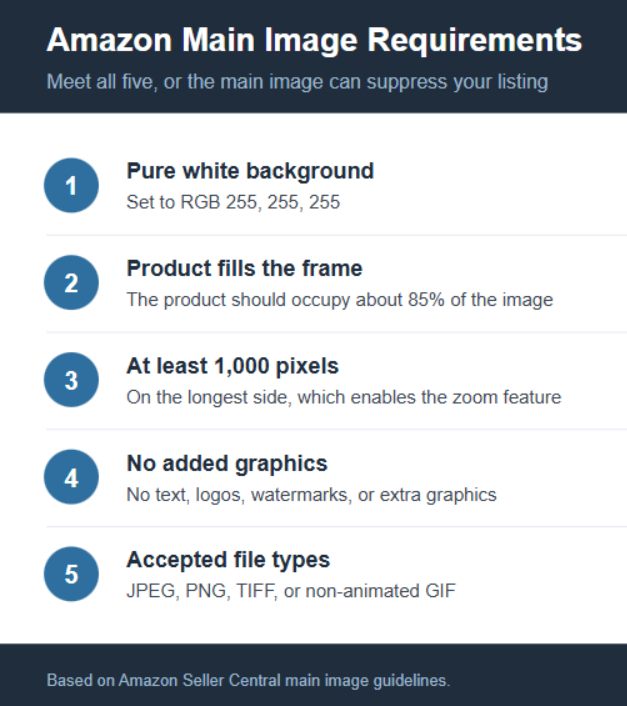
To ensure your product is no longer suppressed on Amazon, photograph your products again. Further, edit your images while following the official guidelines. If your new image meets Amazon’s requirements, your listings will again be visible in search results.
Title Violations
Product title violations are a frequent cause for Amazon listing suppression because the marketplace enforces both formatting and length rules. A title that breaks one of these rules can pull the product from search until it is corrected:
- Prohibited characters such as, $, _, {,}, ^, ¬, and ¦, unless they are part of the brand name
- Promotional wording, for example, “best” or “free shipping”
- Excessive capitalization or repeated keywords
There is also one change every seller should plan for: Effective July 27, 2026, Amazon requires product titles in all categories except media to be 75 characters or fewer, including spaces. Titles left over the limit will be shortened to Amazon’s recommendation over time. Alongside this, Amazon has added the Item Highlights field, which provides about 125 searchable characters for materials or use cases that no longer fit in the title.
To fix the suppressed listings, go through the title, bullet points, description, and search-term fields; remove any restricted terms; and resubmit. You can also move the supporting detail into Item Highlights.
Missing or Incomplete Product Details
Every product category has a set of required attributes. A listing will get suppressed in Amazon search if it has any of its fields blank or filled with invalid details. The marketplace determines what the product is and whether it should be indexed based on these fields. Hence, a few missing or invalid data fields can directly impact search visibility.
Attributes that commonly cause suppression when they are absent or incorrect:
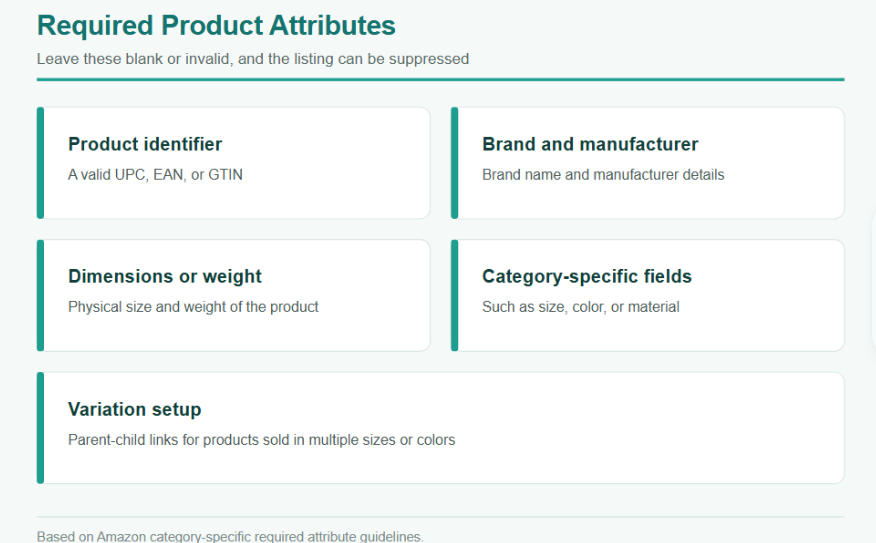
To ensure your listing is visible again, open the suppressed listing and fill in every required field with accurate details. If you have multiple products with the same issue, use a bulk upload template. It’s faster than fixing one listing at a time.
Prohibited Keywords
Some words and phrases are restricted throughout an Amazon listing, not just in the title. When they appear in bullet points, descriptions, or backend search fields, the product can be search suppressed until they are removed.
Restricted terms commonly include:
- References to other brands, sellers, or competitors
- Medical, health, or safety claims that the product is not certified for
- Prohibited or offensive language and terms that Amazon blocks in specific categories
To fix suppressed listings on Amazon flagged for the banned words and phrases, revisit your title, bullet points, description, and backend search fields. Remove any restricted terms, and resubmit the listing.
Wrong Category
A product placed in the wrong category can get your listing suppressed, and the reason is structural. Each browse node has its own set of mandatory fields, such as size and fabric for apparel or voltage for electronics.
A product carries the fields that its assigned category requires. If it lands in a category it was not meant for, whether a seller made the error or Amazon reclassified it automatically, the new category’s mandatory fields are left unmet. The listing stays suppressed until the product is assigned to the correct category with those fields filled in.
Here’s how you can fix it: Confirm the item type and category, add the attributes that category requires, and reassign the product to the correct browse node by editing the listing in Seller Central or through a flat file.
Note: A mix-up over category is a data problem, and editing the listing clears it. However, deliberately slotting a restricted product into an unrelated category to push it past gating or certification requirements is a clear policy violation. It can get your listing suspended rather than suppressed.
Duplicate ASINs & Catalog Conflicts
If the same product appears on two or more pages, or several sellers feed conflicting details into one ASIN, Amazon has no single reliable version to display. Hence, it suppresses the affected listing.
This usually happens when:
- Two or more pages for one product, often created by accident during listing setup
- One product is submitted using a different product UPC or EAN. Hence, a second page for the same product is created.
Merge the duplicate listings. Ensure the product has a single listing with all the attributes, and also correct the product ID if needed to fix Amazon listing suppression.
Why Is My Amazon Product Listing Still Suppressed After I Fixed It?
Sometimes an Amazon suppressed listing is corrected and resubmitted, yet it stays out of search. A few patterns account for most of these cases:
- Edits made during the review window: After a resubmission, Amazon needs time to revalidate the listing. Making further changes during that window can restart the review and delay the outcome. Submit the correction once and let the review finish before adjusting the listing again.
- A second issue behind the first: Amazon often shows one flag at a time. Once that review is complete, visit the Fix Your Products page again, because a second issue, say a missing attribute hidden behind the image error, only appears after the first is cleared.
- A change that doesn’t quite meet the rule: A title cut to 80 characters, or an image on a background that’s nearly but not quite white, looks fixed and still fails. Check the exact specification, not a close approximation, before you resubmit.
- The wrong field corrected: The flag names a specific field. Editing a related but different one, for example, the wrong image variant or a child ASIN instead of the parent, would mean that the issue is still not fixed.
After Amazon reviews your changes, check whether the suppression message changed. If it changed or disappeared, your fix worked, but there may be another issue to solve. If the same message is still there, you still did not fully meet Amazon’s requirement.
How to Prevent Listings from Getting Suppressed Again?
Fixing a suppressed listing restores it, but preventing the issue from reappearing protects your sales and spares a product the days it would otherwise spend out of search. Most Amazon listing suppression can be avoided by reviewing each listing before it goes live and monitoring it afterward.
Thus, before a product goes live, confirm if:
- The main image meets Amazon’s image compliance requirements
- The title is within the character limit and free of prohibited symbols and promotional wording
- Every required attribute for the category is complete and accurate
- No restricted terms appear in the title, bullets, description, or search fields
- The product is in the correct category with a valid product ID
Requirements & compliance rules also change over time. A listing that met every rule at launch can be suppressed months later when Amazon revises a standard. Review the Suppressed tab periodically to catch these cases early. Tracking Amazon’s policy announcements will also help you update a listing before an update in its requirements removes it from visibility.
Note: Suppression is only one reason a product can lose visibility on Amazon. A listing can clear every compliance rule and still underperform due to multiple reasons, including thin content, incorrect keyword targeting, and low-quality images.
When It’s Amazon Listing Suspension, Not Suppression…
The fixes covered so far share one condition: the product is still in Amazon’s catalog. An Amazon search suppressed listing is hidden from search, but the product page remains, and correcting the flagged element restores it.
Suspension works differently. When Amazon removes an ASIN for a policy, authenticity, or safety violation, the listing itself is taken down, and editing its content has no effect, because the content was never the cause.
Restoring a suspended ASIN calls for an appeal rather than an edit. That appeal centers on a Plan of Action, a document Amazon expects to address three things:
- The root cause of the violation
- The corrective steps taken to resolve it
- The preventive measures that will keep the issue from recurring
Reinstatement follows only once Amazon has reviewed and accepted that submission. This is a slower and more demanding process than a simple listing correction. For that reason, sellers handling a suspension often rely on dedicated Amazon ASIN reinstatement services, where the appeal and its supporting documentation are managed by reinstatement specialists.
Treat Amazon Listing Suppression as an Account Health Signal
Listing suppression should not be something you address only after sales have already dropped. Develop a steady monitoring routine to review search-suppressed, inactive, and low-quality listings, and account health warnings.
In practice, that means:
- Checking the Search Suppressed and Inactive Listings tab,
- Reviewing the Fix Your Products page,
- Watching your Performance Notifications, and
- Keeping an eye on account health for any policy or compliance risk.
Not every suppression starts as an account health issue, but it is often where broader compliance problems become visible first. The aim is to catch these signals before they sit unresolved long enough to affect revenue, advertising performance, or catalog stability.
A short routine handles most of it: check the flagged listings, assign ownership of each fix, record what was changed, and confirm if the issue has cleared. Done consistently, that turns suppression from a sudden loss of traffic into a manageable, routine part of catalog operations.